A steel drawing packet can contain the right piece marks and still contain an old sheet. A release check compares the files received with the project’s current drawing register, then connects each piece or assembly identifier to the sheets needed for that package. This guide gives a document-control example for a fabricator or detailing coordinator checking an issued packet. Use it to identify missing files and revision questions for the responsible team. Technical review, design decisions and authorization to fabricate follow the project’s agreed process; the checklist records those references rather than granting approval.
Start with the packet you actually received
Choose one release, sequence or area to check. Record the transmittal identifier, issue date, intended use and the drawing register supplied with it. Keep a list of the files actually received, including their sheet numbers and revision labels. A folder name such as “latest drawings” gives you less to check than a dated register and a specific file list.
In the AISC scheduling and estimating teaching module, erection drawings identify where members belong and support locating the members shown on shop drawings. This historical educational material explains the relationship between the documents. Your project’s documents define its actual issue, review and release procedures.
Connect a mark to both drawing references
For each piece or assembly in the selected package, note the shop sheet and the erection-sheet reference used by your team. Record the revision of each sheet separately. This produces a small cross-reference that can expose a sheet absent from the packet, an unexplained mark, or a file that differs from the register.
For a bridge-specific reference, Table 6.12.4.3 of Caltrans Bridge Design Memo 6.12, August 2021 checks consistency of piece marks between erection and shop drawings. That memo addresses steel bridges. The administrative example below is a discussion aid, not a replacement for a project’s review requirements.
Worked example: one old sheet and one missing file
The following labels, marks and revision numbers are fictional. They illustrate a file comparison only, with no design dimensions, client data or fabrication instructions.
The register for Example release A lists three sheets. The packet contains only two:
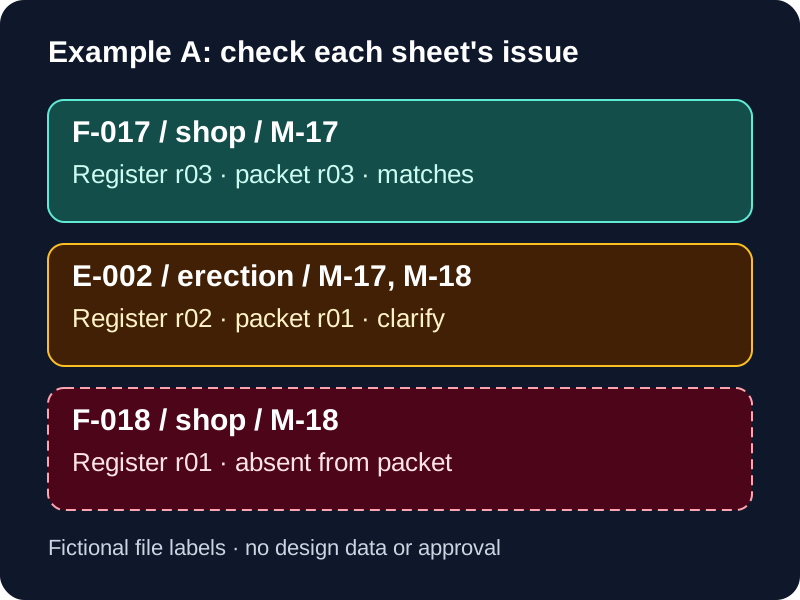
Now compare the same packet by mark:
| Mark | References in this example | Follow-up |
|---|---|---|
| M-17 | Shop sheet F-017 r03 and erection sheet E-002 r01. | F-017 matches the register. Ask for the current E-002 issue: the register lists r02. |
| M-18 | Erection sheet E-002 and shop sheet F-018. | E-002 needs its issue resolved, and F-018 r01 is listed in the register but absent from the packet. |
M-17 appears on both received sheets, but that match alone does not settle E-002’s revision. M-18 exposes a different problem: a referenced shop sheet is missing. Recording the two exceptions separately gives the recipient a specific question to answer.
In this example, F-017 r03 and E-002 r02 have different revision numbers. Each can match its own register entry. Compare a sheet with the current issue recorded for that sheet; comparing the numbers of two different sheets would not catch either exception reliably.
Write an exception that someone can close
Give each issue an identifiable file or mark reference, the register basis, the question and a responsible recipient. Keep the wording specific enough that the recipient can reply with a file or a clarification. Avoid replacing an unresolved file with an assumption about which revision the shop should use.
For the example above, the request could read:
Package: Example release A
Register basis: REG-A-04
Exception 1: E-002 received as r01; REG-A-04 lists r02.
Exception 2: F-018 r01 is listed but was not received.
Requested response: identify the current files and confirm packet status.
Recipient / target response date: to be agreed with the project team.
If the reply changes the register, record that new basis as well as the replacement files. Retain the original transmittal reference so the follow-up can be traced. The people responsible for the package should then communicate the current issue to its intended shop and field recipients.
Keep completeness, review and authorization visible
Once the missing or superseded files have been clarified, repeat the comparison against the confirmed register. Close an exception with the response reference and the person who confirmed it. Then record the package’s review and release status under the project’s procedures.
A useful administrative record shows three separate things: which files are in the packet, which issues remain open, and where the relevant review or authorization is recorded. Completing the file comparison supplies the first of those checks. It does not establish that a connection, dimension, erection method or other technical detail has been reviewed.
Where a change affects work already issued, ask the responsible project team to identify the affected sheets, marks and recipients. Keep that clarification with the package. This guide does not prescribe changes to steel that has already been cut, assembled or erected.
Copy a release cross-reference
Start with this small record and add the fields your shop uses. Scope mark identifiers to the project and package so a similar label from a different release is not mixed into the check.
Project / release or area:
Transmittal received / date / intended use:
Current register reference and issue:

Mark:
Shop sheet and received revision:
Erection sheet and received revision:
Register entry checked for each sheet:
Missing or superseded file / open question:
Responsible recipient and response reference:
Packet review / authorization reference:
Recipients notified of the confirmed issue:
For a large release, keep the same fields in a sheet register or your existing document-control system. Agree which records the receiving team will use to identify the current issue before the handoff. This example’s file labels are not a recommended naming convention.
Discuss the release scope with your detailer
For help with a steel package, describe the release or area, the drawing register, files already issued and the unresolved references. State who manages review comments and accepts the package. Our steel fabrication drawing services page covers production handoffs, and erection drawings describes the related field-document scope.
If you are still comparing suppliers before award, use the separate steel shop drawing RFQ checklist. It focuses on defining comparable scope and outputs for pricing. This release example focuses on checking the packet received for an identified package.